Troy Tweaks

Max Performance.
Zero Delay.

Troy Tweaks gets Windows ready for gaming: max power plan, priority for your game, less running in the background and lower input lag. All on one screen, and everything goes back to normal in one click.
One-click undo Automatic restore point Never touches game files
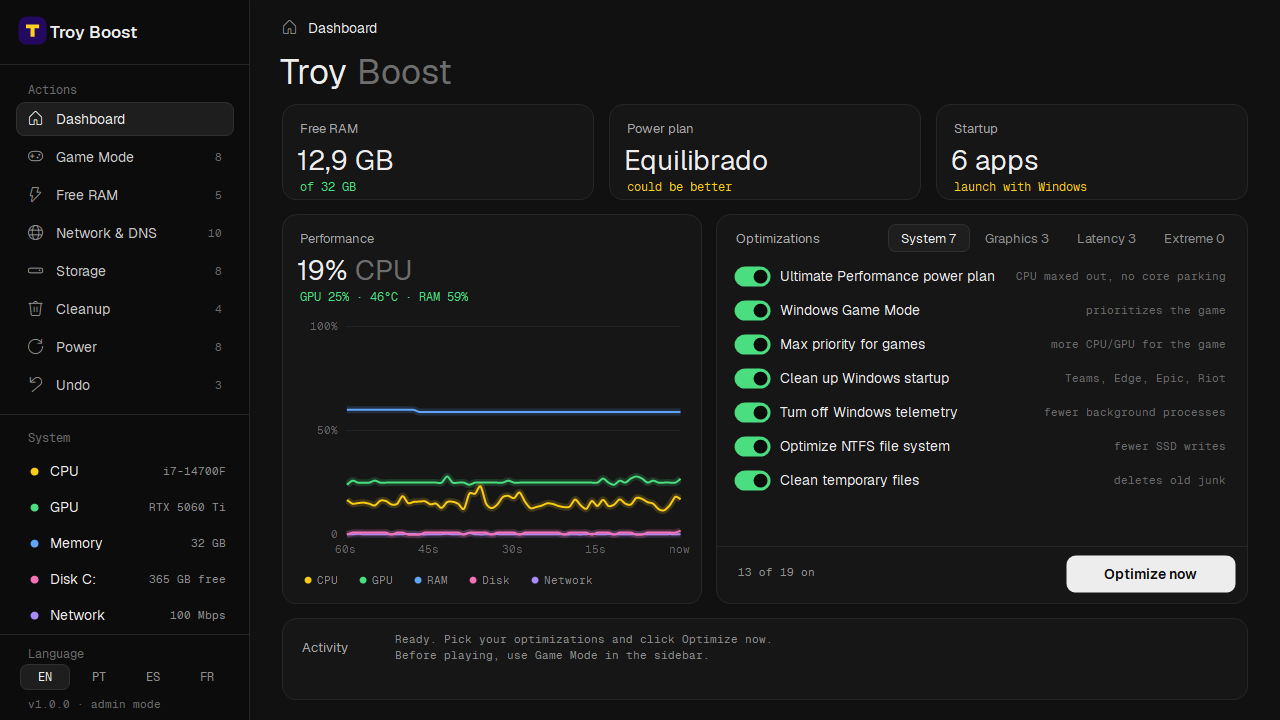
Troy Tweaks — Dashboard
Troy Tweaks dashboard: free RAM, power plan, live CPU, GPU and RAM graph and the list of enabled tweaks
1K+PCs optimized
5.0user rating
99%satisfaction rate
7day money-back guarantee
What it changes

Every tweak explained,
nothing hidden

You turn each tweak on or off. The safest ones come pre-selected, and each one tells you what it does in a single line.

System

7 tweaks
  • Ultimate Performance planCPU at full speed, no core parking
  • Max priority for gamesmore CPU and GPU for the open game
  • Clean up startupTeams, Edge and launchers stop auto-starting
  • Turn off telemetryfewer background processes

Graphics

5 tweaks
  • Hardware GPU schedulingless input lag
  • MSI mode on your GPUfaster interrupts
  • Turn off Game Bar and recordingfrees resources in-game
  • Turn off MPOoptional, only if your screen flickers

Latency

4 tweaks
  • CPU scheduling for gamesfocus on the game you have open
  • Turn off Nagle and network throttlingpackets go out instantly
  • High-precision timersteadier frame pacing
  • Turn off mouse accelerationmore consistent aim
EXTREMERisky options (Spectre/Meltdown, HPET, Defender) live in a separate tab, off by default, and the app asks you to confirm before applying them.
Before every match

Game Mode
in one click

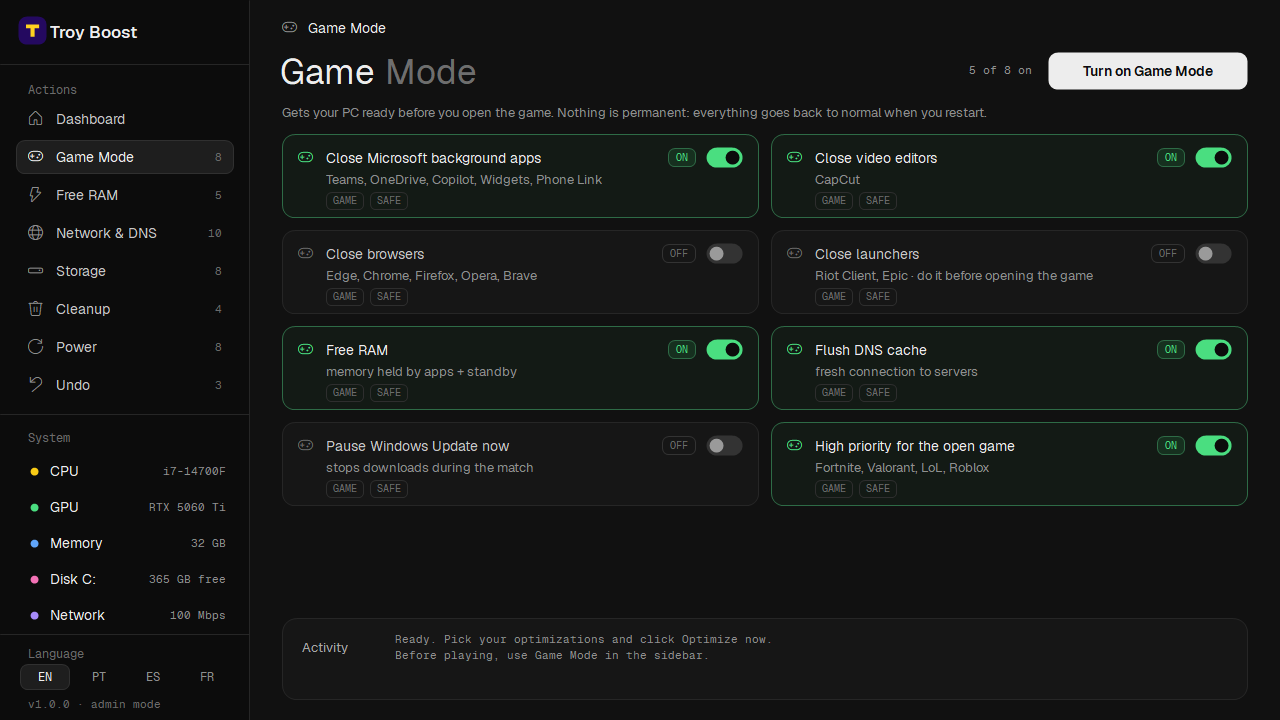
Closes what's weighing on your PC in the background, frees RAM, flushes DNS and gives your game high priority. Nothing is permanent: restart and it's back to normal.
Game Mode 8 actions
Free RAM 5 actions
Network & DNS 10 actions
Storage 8 actions
Cleanup 4 actions
Power 8 actions
Troy Tweaks — Game Mode
Game Mode screen: cards to close background apps, free RAM, flush DNS and set high priority for the game

Windows-level tweaks, so they work with any PC game

FortniteValorantLeague of LegendsCS2MinecraftRobloxWarzoneApex LegendsGTA VRocket League
How it works

From checkout to gaming
in 3 steps

Step 01

Buy

Pay securely through Whop. As soon as the payment goes through, the download is ready in your Whop account.

Step 02

Install

Run the installer and click Next. It adds a shortcut to your desktop and Start menu.

Step 03

Optimize

Pick your tweaks, click Optimize now and restart. Before you play, turn on Game Mode.

Safety

Built so you
never regret it

Undo everything

Before changing anything, the app saves how it was. One click on Undo and your PC is back to its original state.

Restore point

It creates a Windows restore point before optimizing, as a second safety net.

Hands off your games

No injecting, no modifying game files. Only Windows' own settings.

Uninstall = revert

Uninstalling Troy Tweaks automatically reverts every change it made.

What gamers say

From the creators and competitive players behind Troy Tweaks

Vampulol
Vampulol@vampulolCreator

My game finally feels smooth. No more random stutters in the middle of a fight, and my edits feel way more responsive.
Xamito
Xamito@xamitos2Pro Player

Ran it before my last tournament and the difference was instant. FPS stays stable, input delay feels lower and zero stutters.

Klaus
Klaus@klausfntContent Creator

Recording while I play used to kill my FPS. Now the game stays smooth and my clips come out clean, no lag at all.

Product

Troy Tweaks

New release Troy Tweaks dashboard
one-time payment · personal license
  • 19 tweaks across System, Graphics and Latency
  • Game Mode, Free RAM, Network & DNS, SSDs, Cleanup and Power tools
  • Live graph of CPU, GPU, temperature, RAM, disk and network
  • Automatic backup and one-click Undo
  • All 1.x updates included
Get Troy Tweaks
CardPayPalInstant delivery7-day money-back
FAQ

Frequently asked
questions

Can't find yours? Reach out to support.

Can I get banned for using it?

Troy Tweaks never opens, modifies or injects anything into your games. It only changes Windows settings, the same ones you could change by hand in the system settings.

How much FPS will I gain?

It depends on your PC. Systems with lots running in the background, or Windows on the Balanced power plan, usually notice the biggest difference, especially in stutters and input lag. We don't promise a number: the app shows CPU, GPU and RAM usage live so you can see for yourself.

What if I don't like the result?

Click Undo and everything goes back to how it was. If you still don't want to keep the app, you have 7 days to ask for a full refund.

I got a "Windows protected your PC" warning. Is it a virus?

No. Windows shows that warning for new apps it doesn't know yet. Click "More info" and then "Run anyway".

What are the requirements?

Windows 10 or 11 (64-bit) and administrator access. GPU temperature in the live graph shows on NVIDIA cards; everything else works with any GPU.

Does it work on laptops?

Yes. Just keep in mind the Ultimate Performance plan uses more battery, so it works best plugged in.

How do I get the app?

Once your payment is approved, you can download the installer right away from your orders in your Whop account.

Can I use it on more than one PC?

The license is personal: use it on your own computers, just don't share it with other people.

Ready to play
without stutter?

Questions before buying? Email us at

Terms of use

License. You get a personal, non-transferable license to use Troy Tweaks on computers you own. Reselling, redistributing or sharing the software is not allowed.

What it does. It changes Windows settings (power, registry, services, startup and network) to improve gaming performance. Before that, it creates a restore point and saves a backup of the original values, which you can restore with Undo or by uninstalling.

No guaranteed results. Gains depend on your hardware, games and drivers. Options marked EXTREME may reduce security or stability.

Liability. To the maximum extent permitted by law, the author is not liable for damage or loss arising from use of the software. Keep backups of your important files.

Third parties. Includes the Geist and Geist Mono fonts under the SIL Open Font License 1.1.

Refund policy

You can ask for a full refund within 7 days of purchase, no questions asked.

Request it through the store where you bought it or by email at . Before uninstalling, use Undo in the app (or just uninstall, which reverts everything automatically).